


How to Log Into Twitter / X with a Token
How to Log Into Twitter / X with a Token: Complete Guide
Logging into Twitter (X) with a token is a way to authorize without entering a password and without two-factor authentication. Instead of a login and password, the value of the auth_token cookie is used, which the browser saves after a normal login. If you have this token, you can log into your account on another device or in another browser. Below is how to get the token, how to log in with it, and what not to do to avoid losing your account.
Important: never share your auth_token with others. Anyone who gets this token gains full access to your account without a password or 2FA. If your token is stolen, immediately change your Twitter/X password - this will reset all active sessions.
1. What Is a Twitter / X Token and Why You Need It

Twitter/X uses the auth_token cookie to confirm your session. It is a long string of 40 hexadecimal characters. It is created when you log into your account and stored in the browser. As long as the token is valid, the server considers you an authorized user.
The auth_token usually lasts several months. If you log out or change your password, the token is reset.
2. How to Get Your auth_token
1. Open x.com and log into your account normally.
2. Press F12 or Ctrl + Shift + I (Windows/Linux) / Cmd + Option + I (Mac).
3. Go to the Application tab.
4. In the left menu, select Cookies -> https://x.com.
5. Find the cookie named auth_token. Copy its value.
Save the value in a safe place. auth_token is the key to your account.
3. Method 1: Login via the Cookie Editor Extension
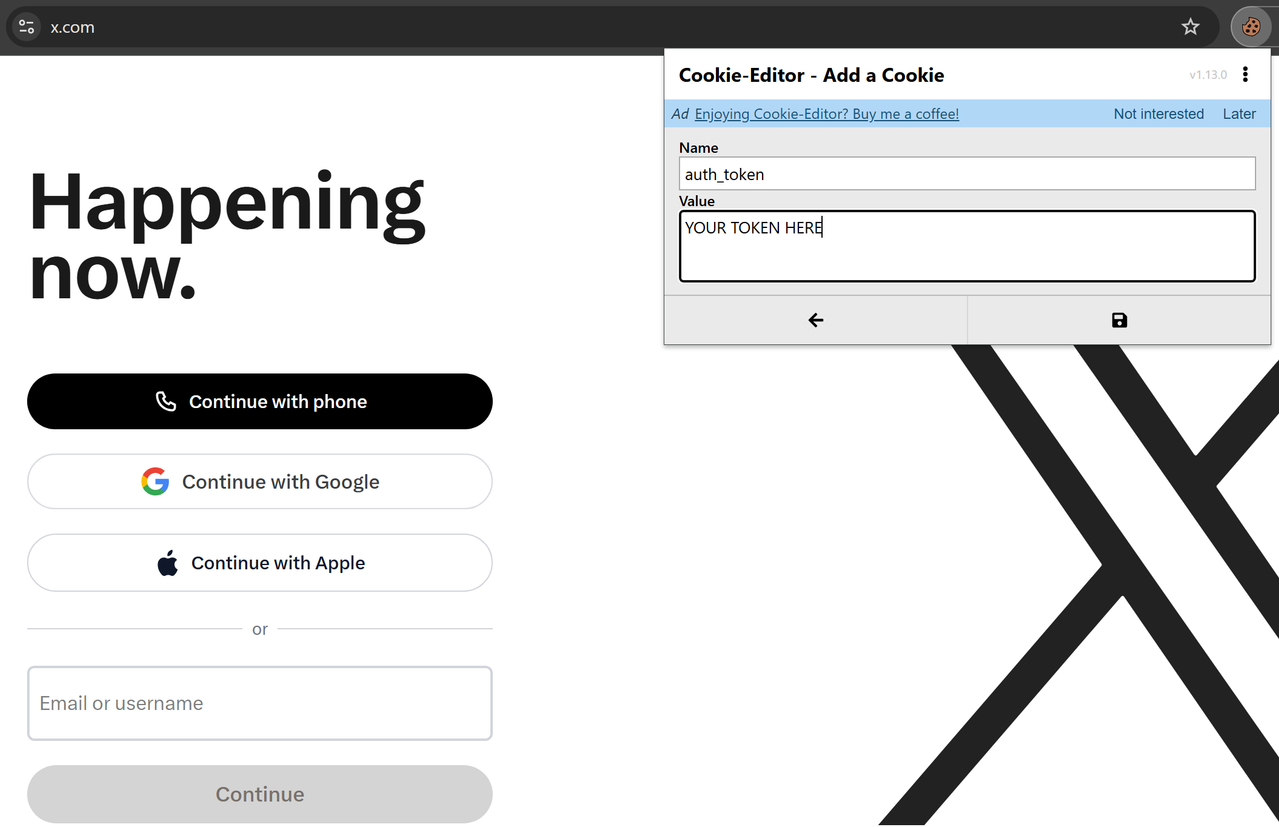
The most convenient way is to use a general-purpose cookie extension, such as Cookie Editor. It is available in the Chrome Web Store and Firefox Add-ons and works with any website, not only Twitter/X.
1. Install the Cookie Editor extension from your browser's official store.
2. Open x.com. If you are not logged in, the login page will open.
3. Click the Cookie Editor icon in your browser toolbar.
4. Find the cookie named auth_token in the list.
5. If it exists, edit its value by pasting your token, and save the changes.
6. If the cookie is missing, click Add (or "+"), enter the name auth_token and the token value, then save.
7. Refresh the page (F5). You will be logged into your account.
This method is safer than editing cookies manually in DevTools, because the extension clearly shows what is being written and where. But only use extensions from official stores.
4. Method 2: Manual Login via DevTools
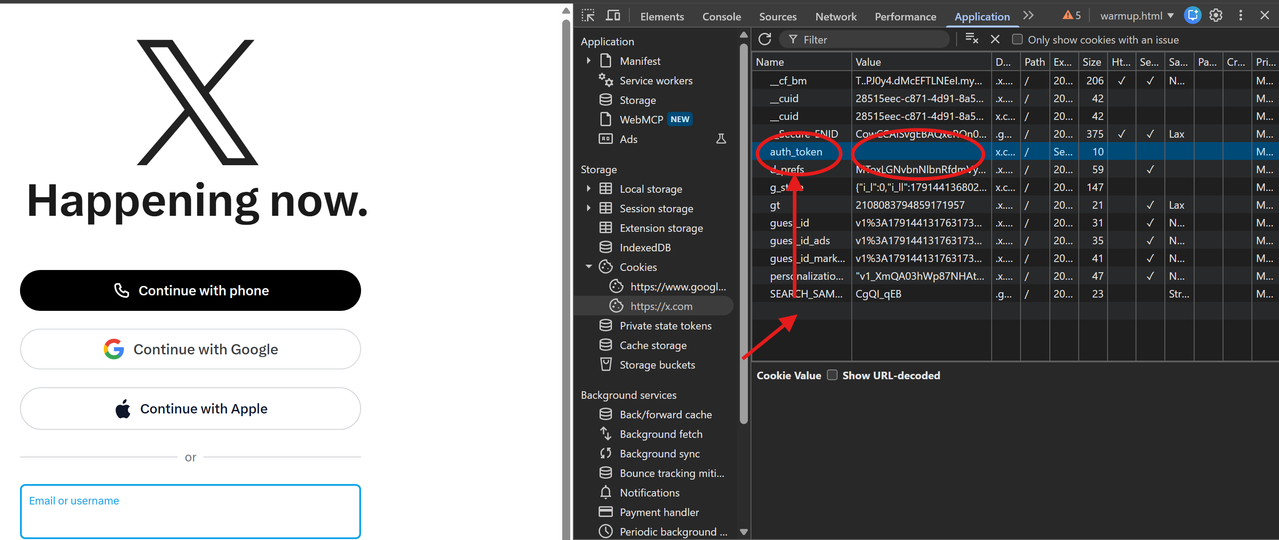
If you do not want to install an extension, you can set the token manually.
1. Open x.com. If you are not logged in, the login page will open.
2. Press F12, go to Application -> Cookies -> https://x.com.
3. The auth_token cookie may be missing from the list if you are not logged in. In that case, create it manually: right-click at the end of the cookie list, select Add, enter the name auth_token and paste the token value into the Value field. Press Enter to save.
4. If the auth_token cookie already exists, just double-click its value, paste your token, and press Enter.
5. Refresh the page (F5). You will be logged into your account.
5. Common Mistakes When Logging In with a Token
The token was copied with spaces or line breaks. The token must be a single string without extra characters.
A token from another service was used. The auth_token from Twitter/X only works on x.com. Tokens from other sites will not work.
The token is outdated. If you logged out or changed your password, the token is reset. You need to get a new one.
The cookie domain is incorrect. Make sure the domain is .x.com, not x.com or .twitter.com.
6. Security: What to Remember
auth_token is essentially a second password. Anyone who gets this token can log into your account without a password or 2FA. Therefore:
Do not share your token with third parties.
Do not paste the token on untrusted websites or in suspicious extensions.
Do not store the token in plain text in notes or messengers.
Do not use someone else's tokens. This violates Twitter/X rules and may lead to a block.
If you suspect the token is compromised, change your Twitter/X password. This will reset all active sessions and invalidate the old token.
Conclusion
Logging into Twitter/X with an auth_token is a quick way to authorize if the token belongs to you. The most convenient option is the Cookie Editor extension, which works with any site. If you do not want to install extensions, you can set the token manually via DevTools. The main thing is to remember that auth_token gives full access to your account, so handle it as carefully as you handle your password.
Keywords: Twitter token login, auth_token Twitter, X token login, Twitter X token, how to log into Twitter without password, auth_token x.com, Twitter token authorization, X login via cookie, Cookie Editor.